
Pt 2 - AI Slop Wrangling - Miws™ Framework Plugins


Software projects often begin with expensive, ambiguous conversations where clashing opinions lead to "analysis paralysis." These debates frequently revolve around architectural nuances and scheduling further meetings rather than progress.
Rather being tortured from these indecisions, there are universal needs of a chosen framework to fit into the Core Four. This includes the following:
- Module Boundaries
- Project File Policies
- File & Project Generators
In the following sections, I'll review these as shippable pieces of Framework Plugins.
Want to save $1.5M in architectural decision making and get these guardrails for your Nx Workspace? Sign up and keep up to date with Miws™ plugins.
Module Boundaries
Framework plugins facilitate standardized project creation using a common set of tags. These boundaries enforce architectural integrity from the moment a project is initialized within The Core Four™ ecosystem.
The base plugin for the Miws™ (Meeee workspace or Mutable Ideas Workspace) contains the boundaries for The Core Four™. With Nx adopting the new eslint flat config using a module javascript file, adding the module boundaries from a plugin becomes an easy import.
// eslint.config.mjs

import {
  miwsModuleBoundaries
} from '@mutable-ideas/ws-plugin/eslint';
// Left of the eslint is left out for brevity
{
  files: ['**/*.ts', '**/*.tsx', '**/*.js', '**/*.jsx'],
  rules: {
    '@nx/enforce-module-boundaries': [
      'error',
      {
        enforceBuildableLibDependency: true,
        allow: ['^.*/eslint(\\.base)?\\.config\\.[cm]?[jt]s$'],
        depConstraints: [
          {
            sourceTag: '*',
            onlyDependOnLibsWithTags: ['*'],
          },
          // Miws Module Boundaries for The Core Four
          ...miwsModuleBoundaries
        ]
      }
    }
  }
The @mutableideas/ws-plugin on initialization adds these boundaries to the Eslint configuration file. This is to enforce our architecture at scale for consumers of the plugins.
Project File Policies
While standard schematics for NestJs or Angular provide quick scaffolding, they often lack a well-defined project intent. Without clear policies, code reviews frequently flag misplaced files—such as an Angular Route Guard appearing in a system design library—leading to architectural drift.
This type of code generation allows easy creation, but poorly aligned to a particular project. So what option do we have?
The @mutableideas/ws-devkit ships with a Project File Policy ESlint rule so certain file extensions belong to certain project types. This eases an engineer pain of accidentally creating a file in the wrong project. The choice for the engineer and coding agent has already been defined. The slop is wrangled.
{
  "projectFilePolicies": {
     ".contract.ts": {
       "@mutableideas/ws-plugin": {
         "tags": [ regex1, regex2 ],
         "matchAll": true
       },
       "@mutableideas/ws-nest-plugin": {
         "tags": [regex1, regex2 ]
       }
     }
  }
}
File extension types may have the same extension, so framework plugin has it's own set of acceptable tags. The lint rule reads the policies and determines if the file is in the correct type of project.
Project & File Generators
Coding agents learn from existing repository patterns, but without guidance, they may struggle to identify the correct project for a new file. This ambiguity causes application concerns to bleed across boundaries, resulting in "god modules" characterized by hundreds of lines of imports. Because software engineers are ultimately responsible for production code, they need tools that automate this enforcement.
In Pt 1 - AI Slop Wrangling in Nx Workspaces - The Core Four™, I discussed the need for a common understanding of what fits where in the architecture. To ease that pain, Framework Plugins keep your architecture enforced for how teams use the Framework.
Library Generators
Enforcing the architecture starts with Nx's module boundaries. The Core Four™ segregate patterns, tech, capability, and business domains.
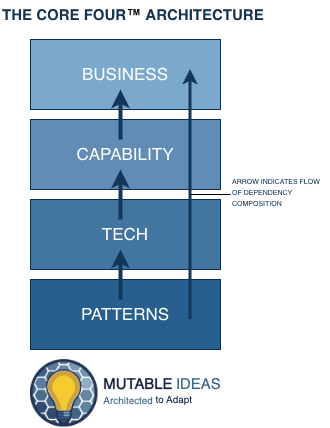
This gives a good start on the responsibilities of each domain. The concern now is mixing several framework layers and how they fit into each of the Core Four™. So we need to address, what framework specific concerns do we have and what tags should be added for the projects?
Project Tagging
Each project contains three tags; domain, type, and framework. This multidimensional tagging helps keep projects from crossing incorrectly in The Core Four™, keep framework projects from leaking into one another, and enforces framework project organization through type. I'll cover NestJs project organization in Part 3.
- Framework - Defines which framework the code belongs to. e.g.
framework:nest,framework:ng,framework:any. - Domain - Always assumes a combination of The Core Four™ and the domain existing within: e.g.
domain:pattern/cache,domain:tech/cache/gcp/memory-store,domain:capability/social-media/facebook,domain:business/social-sprinkler/core - Type - The type of project within a given framework. e.g.
type:nest-contracts,type:contracts,type:nest-infrastructure.
Consistent tagging helps enforce the rules of our module boundaries. It also helps standardize on how projects are created using Miws™. With the consistent tagging, each project generator takes three parameters:
- The Core Four™ type
- A domain for where your team wants to organize the project
- Type - the type of project to generate
Running the command below, the engineer or coding agent can choose between all the current registered project types.
npx nx g @mutableideas/ws-plugin:library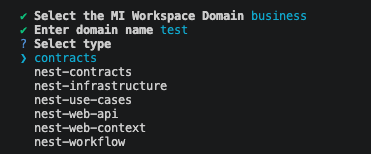
File Generators
Framework plugins dictate the specific project where a file is created. Miws™ encourages the use of intention based file extensions. In the .middleware.ts file extension for the @mutableideas/ws-nest-plugin is only allowed to exist in the type:nest-web-context. The nest-web-context project acts as the glue between request and response streams and service logic such as populating request context values.
Project file policies in the Framework plugins are shared between the lint rule and the file generator to select the correct project type for the file to live.
export default composeGenerator(
  // ...rest of code left out for brevity
  setProjectContext(
    { libraryType: NestLibraryTypes.CONTRACTS },
    selectProject(
      (config, context) => context.projectFilePolicies.fileAllowedInProject({
        fileName: '.entity.ts',
        projectTags: config.tags
      })
    )
  )
  // rest of code left out for brevity
);
The composeGenerator ensures the workspace has been set up with the appropriate Miws™ configurations. It's not the conventional way to write generators; however, a number of different functions in the @mutableideas/ws-devkit allow for creating files, updating configurations, setting project context, and reading the current file policies.
The point of interest is the setProjectContext. It sets which project the file can be added. The selectProject is a fall back inside of the setProjectContext filtering the .entity.ts file type project configs allowed to be selected. The project file policy and the file generator share configuration.
All file generators use the coreFour, domain, name, and type for parameters.
Running the following command shows the list of available file generators.
npx nx g @mutableideas/ws-plugin:file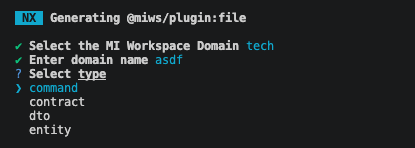
The example above shows the available file generators registered through a Framework plugin's initialization.
Summary
The Miws™ Framework plugins ship with rules that keep the architectural integrity intact. Through a common set of command parameters in the file and project generators, software engineers and coding agents will not have to guess how to name projects or where certain files can live within projects.
Want to save $1.5M in architectural decision making and get these guardrails for your Nx Workspace? Sign up and keep up to date with Miws™ plugins.